My Homelab
The infrastructure behind the systems I build at home.
SERVERS · NETWORKING · SELF-HOSTING
Status: Active · Continuously evolving
Overview
My homelab is the infrastructure behind most of the technical projects I build at home.
What started as a way to experiment with Linux, Raspberry Pis and self-hosting gradually grew into a small collection of machines with very different responsibilities. Today, it runs parts of my smart home, stores historical house data, hosts self-hosted applications, handles backups and databases, provides local network services and gives me somewhere to experiment with things like AI, automation and monitoring.
I deliberately try not to run everything on one powerful server. Instead, the main machines each have a clear role. My Ubuntu server handles most traditional server workloads, Docker applications, databases, storage and infrastructure. A dedicated Raspberry Pi 5 runs Home Assistant so experiments elsewhere in the lab cannot interfere with the basic operation of the house. My Mac mini M2 has become the always-on compute node for Home Intelligence, analytics and AI, while Time01, another Raspberry Pi 5, exists purely as a dedicated GNSS-disciplined network time server.
The network around them has evolved as well. Instead of keeping everything on one flat LAN, I use UniFi with separate Core, Servers and IoT networks, allowing infrastructure, personal devices and lower-trust smart-home hardware to have different boundaries and access rules.
More than anything, the homelab is where I learn. It gives me a real environment in which I can build something, break it, figure out why it broke and then improve the architecture afterwards.
It is never really finished. Hardware gets repurposed, services move between machines, new ideas appear and something that starts as a small weekend experiment regularly turns into a much bigger project.
How it started
My interest in homelabbing really started in 2024.
At the time, I was watching a lot of NetworkChuck and other technical content about Raspberry Pis, Linux, networking and self-hosting. I had always enjoyed computers, but this was the point where I became interested in what happens beyond simply using them: running my own services, configuring networks and building systems myself.
A Raspberry Pi became my first real entry point. I started experimenting with small projects and following tutorials, and one of the first services that genuinely became useful to me was AdGuard Home. It was a relatively simple project, but it introduced me to a lot of ideas that would later become recurring themes in my homelab: DNS, local services, networking, remote management and the idea that something I had configured myself could quietly run in the background every day.
When I moved into student housing, I wanted to take that further. Instead of only experimenting with Raspberry Pis, I decided to build an actual computer that could stay online and run services permanently.
In November 2024, I built the PC that would become my Ubuntu homelab server.
At first, it was mostly a machine to experiment on. I could install Docker, try applications, break things without worrying too much and finally have enough compute and storage to move beyond small Raspberry Pi projects.
The server later moved with me back home, and that is where the homelab really started expanding.
Our house already had Niko Home Control, which gave me another completely different system to explore. Once I started connecting that world with Home Assistant, networking and my server, the projects stopped feeling isolated from each other. Smart-home devices generated data. That data could be stored on the server. Services needed reliable networking. Remote access became useful. Backups became important. Monitoring problems created new projects of their own.
One small experiment kept leading to another.
Over time, the original Ubuntu server became only one part of the setup. Home Assistant had its own dedicated Raspberry Pi, the network became segmented with VLANs, storage and backup infrastructure grew around the server, and eventually other machines such as the Mac mini and Time01 were given their own specialised roles.
That gradual growth is still how I approach the homelab today. I rarely start by designing a huge final architecture. Usually I find something interesting, build a small version of it, learn what works and what does not, and then decide whether it deserves a permanent place in the infrastructure.
A lot of the homelab I have today exists because a project that was supposed to take an afternoon became something much bigger.
The Machines
Over time, I stopped thinking of the homelab as one server and started giving different machines different responsibilities.
I like this approach because not every workload has the same requirements. Home Assistant should stay stable even when I am experimenting with AI. Long-term databases do not need to live on the same machine that runs machine-learning workloads. And something as fundamental as network time can make sense as its own tiny dedicated appliance.
The result is a small group of machines that work together, each with a fairly clear role.
Ubuntu homelab server
Intel Core i7-14700 · 32 GB RAM · 6TB storage · Ubuntu · Docker
This is still the general-purpose workhorse of the homelab.
It runs most of my traditional server infrastructure: Docker applications, databases, InfluxDB, Grafana, n8n, storage and backup-related services. It is also where a lot of experiments begin before I decide whether they should stay there or eventually move onto a more specialised machine.
The server also hosts the long-term Home Intelligence dataset in InfluxDB. Even after moving the actual Home Intelligence compute to the Mac mini, I deliberately kept the historical database here. The server is therefore both an application host and an important data layer for the rest of the lab.
Home Assistant
Raspberry Pi 5 · 8 GB RAM · SSD · Home Assistant OS
Home Assistant runs on its own Raspberry Pi 5 rather than inside Docker on the main server.
I like keeping it separate because Home Assistant has a much more important job than most of my experiments: it operates the house.
Sensors, automations, climate control, covers, lights and integrations should keep working even if I break something on another machine.
Keeping Home Assistant dedicated also means I can restart the Ubuntu server, experiment with Docker or work on Home Intelligence without taking the basic smart-home layer down with it.
Mac mini M2
Apple M2 · 16 GB unified memory · 512 GB SSD
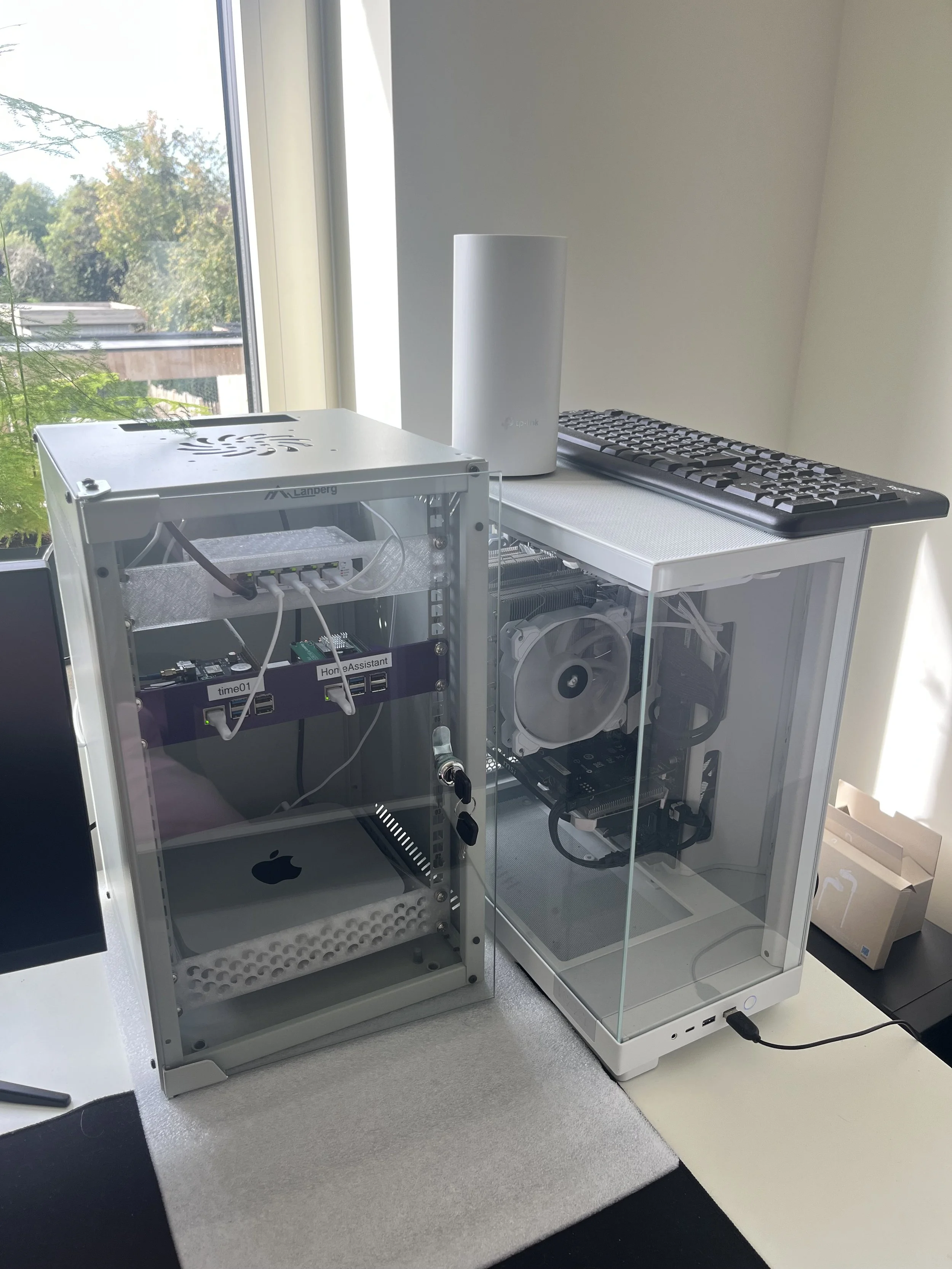
The Mac mini is the newest major addition to the rack and has a very different role from the Ubuntu server.
It used to be my main desktop computer, but after I started using my MacBook Pro as my primary machine, I realised the Mac mini could be much more useful as an always-on compute node.
I reset it, configured it for headless server use and moved the Home Intelligence compute stack onto it. Today it runs the Python analytics, machine-learning workloads, forecasting, Hermes and the wider AI/agent infrastructure.
I think of it as the intelligence and compute node of the homelab, while the Ubuntu server remains the more traditional infrastructure and data server.
Time01
Raspberry Pi 5 · 1 GB RAM · GNSS receiver · hardware PPS · AdGuard Home
Time01 is probably the most specialised machine in the rack.
Its primary role is as a dedicated GNSS-disciplined Stratum-1 NTP server. A u-blox NEO-M9N receiver gets time from GNSS satellites, a hardware 1 PPS signal provides an extremely precise second boundary, and Chrony serves that time to the rest of my network.
The same Raspberry Pi also runs AdGuard Home, giving it a second lightweight infrastructure role as a local DNS filtering and caching service. I like combining these two functions because both are small, always-on network services that benefit from running on a simple and predictable machine.
My Ubuntu server, Home Assistant and Mac mini all use Time01 as a local time source, while other devices can also use it for DNS through AdGuard. It is a good example of why I like dedicated infrastructure nodes: the machine has a small number of very clear jobs, uses very little power and can quietly keep doing them in the background.
Why seperate them?
I could technically consolidate much more of this onto the Ubuntu server, but that is not really the point of the homelab for me.
Giving systems separate roles makes the architecture easier to understand and gives me more freedom to experiment. I can rebuild the AI stack without touching Home Assistant, restart the application server without affecting network time, or change how Home Intelligence works without moving years of historical data around.
It is probably not the smallest possible setup, but it gives me more things to learn from, and that is much more valuable to me than simply minimising the number of machines.
The Network
As the homelab grew, the network around it had to grow with it.
The house originally used a fairly simple flat network where servers, computers, smart-home devices and other clients could all communicate with each other directly. That worked, but once I started running more infrastructure and connecting more IoT devices, I wanted clearer boundaries between devices with very different levels of trust.
Today, the network is built around UniFi. A Cloud Gateway Ultra handles routing, DHCP and firewalling, while managed UniFi switches distribute the network
I currently separate the network into three main areas:
Core: My normal trusted network for computers, phones and general client devices.
Servers — VLAN 20: The infrastructure network containing the Ubuntu server, Home Assistant, Mac mini, Time01 and other server-side systems.
IoT — VLAN 30: A lower-trust network for smart-home and embedded devices such as the P1 meter, solar inverter and other IoT hardware.
The important idea is not simply that these devices have different IP ranges. Traffic between those networks is controlled, so an IoT device does not automatically receive the same access to my infrastructure that one of my own computers has. At the same time, specific communication can still be allowed when it is actually required, for example when Home Assistant needs to communicate with an IoT device.
I also prefer to manage important addresses centrally. Instead of configuring static IP addresses manually on every machine, I use DHCP reservations in UniFi wherever possible. That lets the network remain the source of truth for addressing while still giving infrastructure machines predictable addresses.
Extending the network to the rack
The room containing most of the homelab infrastructure has two Ethernet connections back to the central UniFi equipment.
One is used for the normal Core network and feeds a Deco access point. The other carries multiple VLANs to a UniFi Flex Mini, which acts as the managed switch for the local infrastructure. The uplink carries Core as the native network together with Servers VLAN 20 and IoT VLAN 30, allowing individual ports on the Flex Mini to be assigned to whichever network a device needs.
Home Assistant and the Ubuntu server, for example, connect through dedicated Servers VLAN ports. Using a managed switch here also makes troubleshooting much easier. Just because I can see which device is connected to a port, the negotiated link speed, its VLAN assignment and whether the physical connection is healthy.
This replaced an earlier unmanaged setup and taught me another recurring lesson in the homelab: network infrastructure that is visible and understandable is much easier to operate than something that simply works until the day it suddenly does not.
Remote acces
I also deliberately avoid exposing homelab services directly to the internet wherever I can.
For remote access I use Twingate, which lets me reach internal services without opening a collection of ports on the public side of the network.
That fits the same general philosophy as the VLAN design: give access where it is needed rather than making everything reachable by default.
It is the first and probably only remote acces software I will be using for a while. I got to know it via NetworkChuck and it works flawlessly, plus it’s free.